
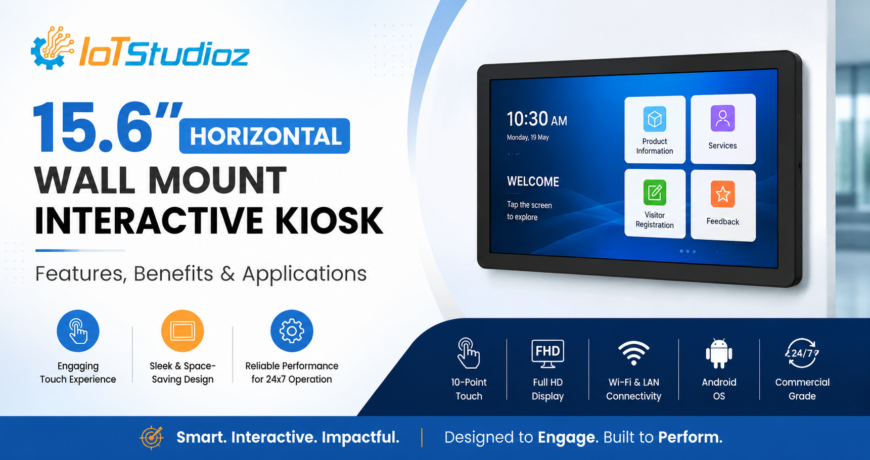
15.6″ Horizontal Wall Mount Interactive Kiosk: Features, Benefits & Applications
Businesses are increasingly adopting self-service technology to improve customer engagement, streamline operations, and deliver information more efficiently. Among the latest digital solutions, the 15.6″ Horizontal Wall Mount Interactive Kiosk offers a compact and practical way to provide interactive experiences in limited spaces.
Designed to be mounted horizontally on walls or other suitable surfaces, this type of interactive kiosk combines a touchscreen interface with digital content, self-service functionality, and smart connectivity. It can be used across retail stores, hospitality, healthcare facilities, corporate offices, educational institutions, and many other environments.
In this guide, we explore the key features, benefits, and applications of a 15.6″ Horizontal Wall Mount Interactive Kiosk and explain why it can be a valuable addition to modern businesses.
What Is a 15.6″ Horizontal Wall Mount Interactive Kiosk?
A 15.6″ Horizontal Wall Mount Interactive Kiosk is a touchscreen-based digital display designed for wall-mounted installation in landscape orientation. The 15.6-inch screen provides enough space for users to interact with menus, forms, product information, directories, applications, and other digital content.
Unlike traditional floor-standing kiosks, a wall-mounted model requires less floor space. This makes it particularly useful for locations where businesses want to introduce interactive technology without occupying valuable walking or seating areas.
The kiosk can be configured for different purposes, including self-service, digital information, wayfinding, customer registration, product browsing, and interactive communication.
Key Features of a 15.6″ Horizontal Wall Mount Interactive Kiosk
1. 15.6-Inch Interactive Display
The 15.6-inch screen provides a convenient viewing and interaction area for customers and employees. Users can navigate menus, select options, enter information, and access digital content directly through the touchscreen.
2. Horizontal Landscape Orientation
The horizontal format is well suited to content such as:
- Digital menus
- Product catalogs
- Web applications
- Registration forms
- Interactive directories
- Promotional content
- Information dashboards
The landscape layout can also make certain applications easier to navigate and display.
3. Touchscreen Interaction
A touchscreen interface allows users to interact directly with the kiosk without requiring a keyboard or mouse. Depending on the configuration, businesses can use touch functionality for browsing, searching, form submission, selection, and self-service transactions.
4. Wall-Mounted Design
One of the biggest advantages of this kiosk is its wall-mounted construction. Installation on a wall helps businesses save floor space while maintaining an easily accessible interactive interface.
It can be particularly useful in reception areas, corridors, retail counters, waiting areas, and other locations with limited space.
5. Compact Form Factor
The 15.6-inch size provides a balance between screen visibility and space efficiency. Businesses that do not require a large display can use this compact format to deploy interactive services across multiple locations.
6. Digital Content Management
The kiosk can be used to display and manage various forms of digital content, including text, images, videos, menus, advertisements, product details, and interactive applications.
When connected to suitable kiosk management software, businesses can also update content remotely depending on their deployment requirements.
7. Connectivity Options
Depending on the model and configuration, interactive kiosks can support connectivity options such as Wi-Fi, Ethernet, Bluetooth, USB, and other interfaces. These connections can help integrate the kiosk with business systems, networks, peripherals, or online services.
8. Customizable Software
Businesses can configure the kiosk according to their specific application. It may run a web-based application, Android application, digital signage software, self-service platform, or customized business application.
Benefits of a 15.6″ Horizontal Wall Mount Interactive Kiosk
1. Space-Saving Installation
A major benefit of a wall-mounted kiosk is efficient use of space. Since the device does not require a floor-standing enclosure, businesses can provide interactive services while keeping walkways and customer areas clear.
2. Improved Customer Engagement
Interactive displays encourage users to actively engage with information instead of simply viewing static signage. Customers can browse products, search for information, complete forms, or explore services at their own pace.
3. Enhanced Self-Service Experience
A kiosk can help businesses offer self-service functionality for routine activities. Customers can access information or complete selected processes without always needing assistance from staff.
This can improve convenience while allowing employees to focus on more complex customer requirements.
4. Better Information Accessibility
Interactive kiosks can make important information readily available. For example, a hotel can provide facility information, while a hospital can display department details and navigation information.
5. Reduced Staff Workload
Automating repetitive information requests and basic processes can reduce the workload on employees. Staff members can spend more time on customer service, operational tasks, and activities that require human assistance.
6. Modern Digital Experience
A professionally installed interactive kiosk can contribute to a modern and technology-driven environment. It can also help businesses create a consistent digital experience across different locations.
7. Flexible Applications
The same hardware platform can support different applications depending on the software and peripherals installed. This makes interactive kiosks suitable for a wide variety of industries.
Applications of a 15.6″ Horizontal Wall Mount Interactive Kiosk
1. Retail Stores
Retail businesses can install interactive kiosks to provide:
- Product catalogs
- Product specifications
- Promotions and offers
- Store information
- Product search
- Customer assistance
- Digital ordering
A compact wall-mounted kiosk can be installed near product displays or checkout areas without consuming significant floor space.
2. Restaurants and Cafés
Restaurants can use interactive kiosks for digital menus, food ordering, promotional content, and customer information.
A wall-mounted configuration can be particularly useful in smaller restaurants where floor space is limited.
3. Hotels and Hospitality
Hotels can deploy interactive kiosks at reception areas, lounges, elevators, or other customer-facing locations.
Potential applications include:
- Hotel information
- Facilities and services
- Local attractions
- Restaurant menus
- Event information
- Guest assistance
- Wayfinding
4. Healthcare Facilities
Hospitals and clinics can use interactive kiosks to help visitors access information and navigate facilities.
Applications may include:
- Department directories
- Doctor information
- Appointment-related services
- Patient registration
- Visitor information
- Wayfinding
5. Corporate Offices
Businesses can install kiosks in reception areas and offices for employee and visitor services.
For example, the kiosk can be used for visitor registration, employee directories, meeting room information, announcements, and internal communication.
6. Educational Institutions
Schools, colleges, universities, and training centers can use interactive kiosks for campus directories, event information, student services, announcements, and navigation.
7. Banks and Financial Institutions
Financial organizations can use interactive kiosks to provide product information, service guidance, branch information, digital forms, and customer assistance.
8. Transportation and Public Spaces
Transportation facilities can use interactive displays for directions, schedules, announcements, maps, and other passenger information.
Wall-mounted installation can be useful in areas where space needs to be carefully managed.
Wall-Mounted Kiosk vs. Floor-Standing Kiosk
Both wall-mounted and floor-standing kiosks offer interactive capabilities, but their ideal applications can differ.
| Feature | 15.6″ Wall-Mount Kiosk | Floor-Standing Kiosk |
| Space requirement | Low | Higher |
| Installation | Wall-mounted | Floor-mounted |
| Portability | Generally lower | Easier to relocate |
| Best for | Compact spaces | Open customer areas |
| Screen size options | Typically compact | Small to large |
| Ideal applications | Information, registration, directories | Self-service, ordering, wayfinding |
For businesses working with limited floor space, a 15.6″ Horizontal Wall Mount Interactive Kiosk can be an efficient option.
Factors to Consider Before Choosing a 15.6″ Interactive Kiosk
Before purchasing or deploying an interactive kiosk, businesses should consider several factors.
1. Screen and Touch Technology
Choose a display and touch technology appropriate for the intended environment and frequency of use.
2. Operating System
The operating system should support the applications and software required for the deployment. Android and other operating platforms may be available depending on the kiosk configuration.
3. Connectivity
Consider whether the kiosk requires Wi-Fi, Ethernet, Bluetooth, USB, or other connectivity options.
4. Mounting Requirements
Check wall strength, mounting compatibility, viewing height, cable routing, and installation requirements before deployment.
5. Software Compatibility
The kiosk should be compatible with the intended applications, content management system, browser-based platform, or self-service software.
6. Security
For public-facing deployments, businesses should consider secure mounting, restricted system access, kiosk-mode software, and appropriate network security.
7. Maintenance and Support
Long-term reliability depends not only on hardware quality but also on software updates, technical support, maintenance, and replacement availability.
Why Choose a 15.6″ Horizontal Wall Mount Interactive Kiosk?
The 15.6″ Horizontal Wall Mount Interactive Kiosk is a practical solution for businesses looking to introduce interactive technology without sacrificing valuable floor space.
Its compact display, horizontal orientation, touchscreen functionality, and wall-mounted design make it suitable for environments where accessibility and space efficiency are important. From retail and hospitality to healthcare, education, and corporate offices, businesses can customize the kiosk around their specific digital requirements.
As customers increasingly expect convenient and self-service digital experiences, interactive kiosks can help organizations improve engagement while making information and services easier to access.
Conclusion
A 15.6″ Horizontal Wall Mount Interactive Kiosk combines compact design with interactive digital functionality. Its wall-mounted installation makes it especially useful for businesses that need an engaging self-service or information solution but have limited floor space.
Whether used for digital menus, product information, visitor registration, wayfinding, customer assistance, or internal communication, this kiosk can support a wide range of modern business applications.
For organizations planning to upgrade their customer-facing technology, a compact wall-mounted interactive kiosk can be an effective step toward creating a more convenient, connected, and digitally enabled environment.
FAQ
1. What is a 15.6″ Horizontal Wall Mount Interactive Kiosk?
It is a 15.6-inch touchscreen kiosk designed for horizontal wall-mounted installation. It can be used for information, self-service, digital menus, directories, registration, and other interactive applications.
2. Where can a 15.6″ wall-mounted kiosk be used?
It can be used in retail stores, restaurants, hotels, hospitals, offices, educational institutions, banks, transportation facilities, and other public or commercial environments.
3. What are the main benefits of a wall-mounted interactive kiosk?
The main benefits include space-saving installation, improved customer engagement, convenient self-service, better information accessibility, and reduced staff workload for routine tasks.
4. Can the kiosk be customized for different applications?
Yes. Depending on the hardware and software configuration, it can be customized for applications such as digital signage, directories, ordering, registration, product browsing, and wayfinding.
5. Is a 15.6″ kiosk suitable for small spaces?
Yes. Its compact wall-mounted design makes it particularly suitable for locations where floor space is limited but businesses still want to provide an interactive digital experience.